Know the state of each room
See Dirty, In progress, Clean and Inspected states.
ROOM CARE & DAILY OPERATIONS
You have rooms to prepare, guests arriving and work that needs to move throughout the day. Lodgewave brings room status, housekeeping jobs and operational handovers into the same property workflow, so your team can see what needs attention and what is ready.
See Dirty, In progress, Clean and Inspected states.
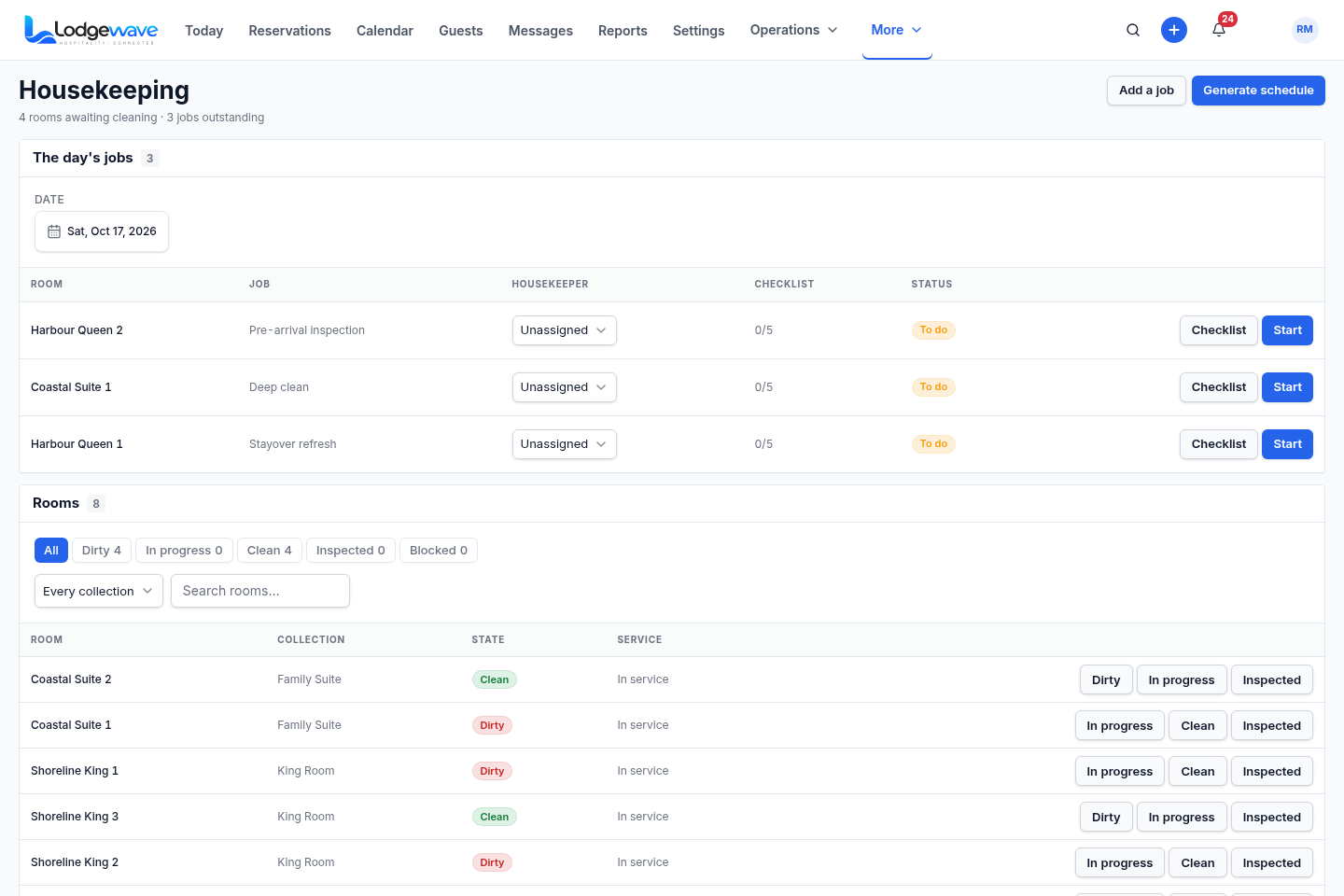
Work from the housekeeping jobs available for the selected day.
Search for rooms and filter the board by the state you want to review.
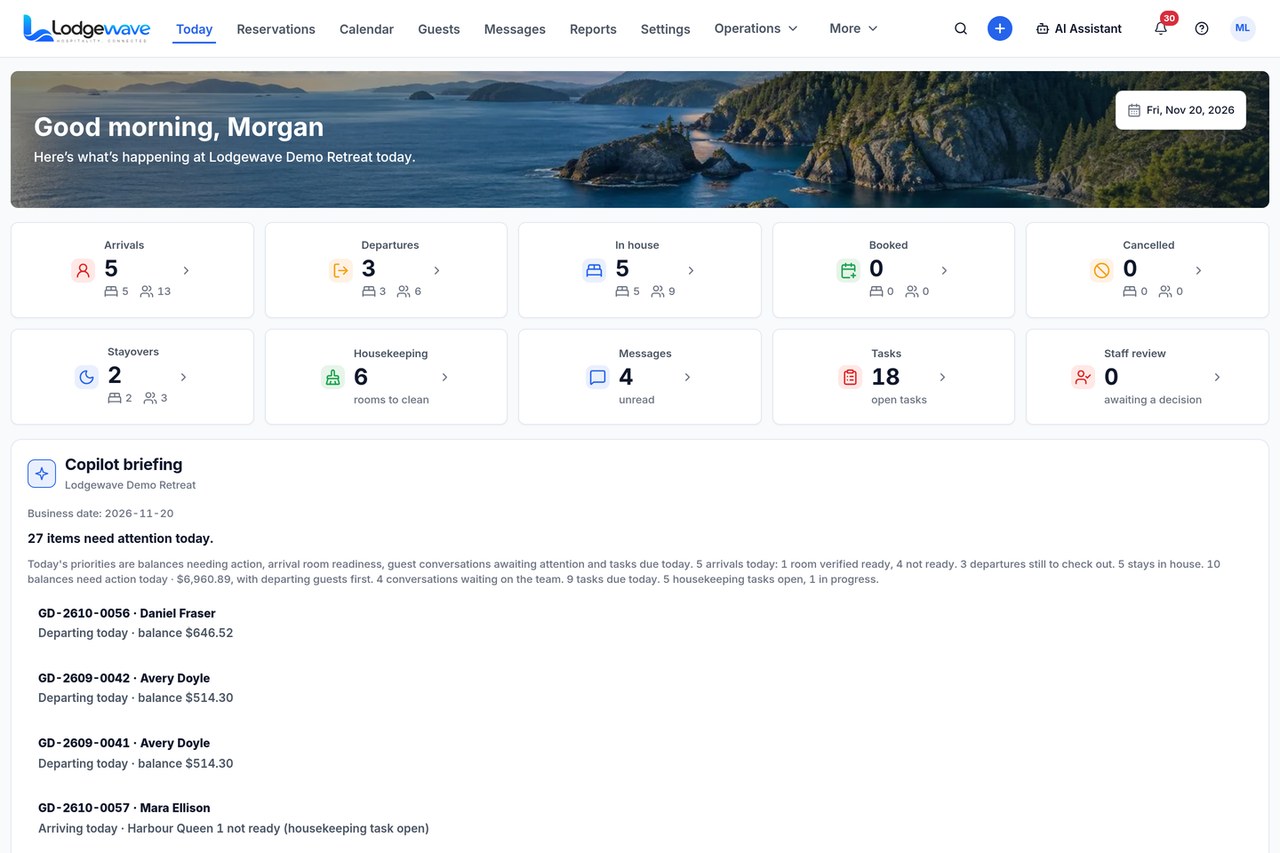
Review housekeeping alongside the arrivals, departures and work around each stay.
WHEN THE ROOM STATUS ISN'T CLEAR
Your housekeeping day follows the guests moving through your property.
A departure creates a room to prepare. An arrival creates a deadline. An occupied room may need service during the stay.
Your front desk needs to know what is ready without asking several people or piecing together separate updates.
When room status lives in messages or paper lists, your team spends time finding information instead of moving the work forward.
Lodgewave gives your team a Housekeeping board and daily work within the same property operating system used for arrivals, departures and stays.
FROM THE FIRST CHECK TO THE NEXT ARRIVAL
Start with the rooms that need attention. Check their current state, work through the housekeeping jobs and keep the room's progress visible to the wider team.
01 SEE THE BOARD
Open the Housekeeping view for the selected day. See the rooms, their current states and the housekeeping work available.
02 READ THE ROOM STATE
Use the room states and filters to identify rooms marked Dirty, In progress, Clean or Inspected.
03 MOVE THE WORK
Use the housekeeping controls and the day's available jobs as the team works through the rooms.
04 HAND IT BACK
Keep housekeeping within the wider operational picture, alongside arrivals, departures and the front desk's need to understand room readiness.
ACTUAL LODGEWAVE INTERFACE
You need to see which rooms need work and how the team moves through the day. These Lodgewave views show the housekeeping board and its place in the wider property operation.
Open the Housekeeping board to review the rooms, available state filters and the housekeeping jobs for the selected date.
Review housekeeping alongside arrivals, departures and other work that needs attention across your property.
FOUR ROOM-CARE STATES
Your team needs a shared understanding of each room's current state. Use the room status to see where the work stands and what needs attention next.
The room needs housekeeping attention.
The room-care work is underway.
The cleaning state has moved to Clean.
The Inspected state is visible when the room reaches that stage.
WHAT CHANGES FOR YOUR TEAM
Your housekeeping team, front desk and managers all need different information about the same rooms. Each person should be able to review the room-care information relevant to their work without rebuilding the day's picture.
QUESTIONS FROM PROPERTY TEAMS
Yes. The Housekeeping board shows your property's rooms and the available housekeeping states for the selected day.
Yes. Your team can use the room-state controls in the Housekeeping interface to move a room through the housekeeping workflow.
Yes. The Housekeeping view includes a day's-jobs area for the selected date. The jobs shown are those available in the product for that day.
Housekeeping sits within the wider Lodgewave property system. Your front desk can review the available room-care context alongside the day's arrivals, departures and guest work.
Yes. Room care is part of the wider property day, alongside departing, arriving and in-house stays. The Today view provides the broader operational context.
Tell us how your rooms are cleaned, inspected and handed back, and how your front desk knows what is ready. We'll walk through the relevant Lodgewave workflow.
BUILT AROUND YOUR PROPERTY
Every property handles room care differently. Tell us how your rooms are cleaned, how work is assigned and how your front desk knows what is ready. We'll learn how your team operates, show you the relevant Lodgewave workflow and discuss how it can fit your property.